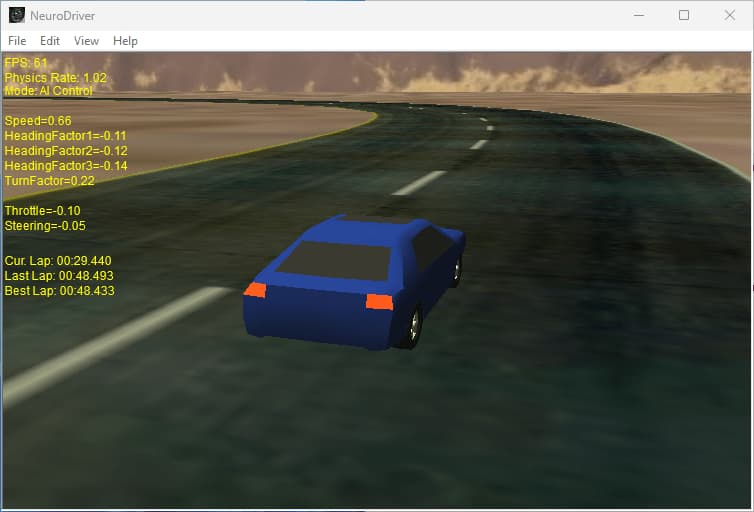
The purpose of this project is to train an Artificial Neural Network to control a vehicle around a racing track.
The track is defined by a few basic waypoints which are interpolated using splines to create a smooth track.
The user drives the car around the track and the collected information is used to train the neural network.
After the neural network is trained we let it control the vehicle.
The projects is written in C++ (MSVC6) and uses DirectX 8 for the graphics.
ODE (Open Dynamics Engine) is used for the car physics.
The track is rendered as a single textured triangle strip and the car model is rendered as a D3DXMesh.
There's also a simple sky box and several camera angles to make things more interesting.
Demo
Download the demo: NeuroDriver1.1.0.3.zip (2.7 MB)
Minimum Requirements:
- Windows 98/ME/XP/2000
- DirectX 8
- 600Mhz CPU
- 64MB RAM
- 32MB Graphics Accelerator
What do all these numbers mean?
At the top left of the demo screen you can see the following stats:
- FPS - Frames Per Second
- Physics Rate - This should be at least 1.0 for real-time physics simulation rate (e.g. 0.7 physics rate means the physics rate is 70% of real-time)
- Mode - Displays the current control mode which is one of the following:
- User Control - when the user controls the car
- AI Control - when an AI driver controls the car
The next 5 stats are the INPUTS to the neural network:
- Speed - The current speed of car (normalized to the range [0 - 1] )
- HeadingFactor1,2,3 - Heading factors for the next 3 waypoints
A HeadingFactor is the Sine of the angle between the current direction of the car and a waypoint position - TurnFactor - Measures difference (delta) between HeadingFactors of several waypoints in front of the car
The next 2 stats are the OUTPUTS of the neural-network:
- Throttle - The amount of throttle applied by the driver (continuous in the range [-1 - 1] )
- (-1) = full brakes
- 0 = Idle
- 1 = full throttle
- Steering - The amount of steering applied by the driver (continuous in the range [-1 - 1] )
- Negative values = left steering
- 0 = neutral steering
- Positive values = right steering
The next 3 stats are timers showing:
- Current Lap Time ( min:sec.msecs )
- Last Lap Time ( min:sec.msecs )
- Best Lap Time ( min:sec.msecs )
Architecture
The main idea for this project is to develop a generic, neural-network based, game AI for vehicle command and control (cars, tanks, aircraft, mechs, etc.)
The 2 main classes of the project are Driver and Vehicle:
The Driver class encapsulates the artificial neural-network (or networks) that make up the "Brain" That controls the Vehicle.
The Vehicle class is an abstract base class from which all vehicles are inherited (e.g. Car)
Each Vehicle class can be controlled by several drivers (objects of the Driver class).
Each Driver is assigned a place (station) in the Vehicle
With this architecture it is possible to simulate a vehicle with several sets of controls.
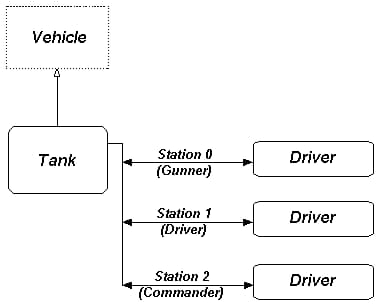
For example, if we would like to simulate a tank - first, we inherit a Tank class from the Vehicle class.
Then we create 3 different Driver objects and assign each one to a different Tank station (see diagram).
We can then train each Driver to control the specific systems of its station according to inputs received From the Tank object.
For the Driver to control the Vehicle, the Driver needs to perform the following actions:
- Get data from the Vehicle (e.g. speed, position of enemy targets, etc.)
- Think (process the data and decide how to manipulate the Vehicle's controls).
- Set the Vehicle controls.
In code it looks something like this:
void Driver::run()
{
    // Get data from the vehicle according to the Driver's assigned station
    data = pVehicle->getData( stationID );

    // Think (this is where the neural-network does its work)
    controls = processData( data );

    // Set the appropriate vehicle controls
    pVehicle->setControls( controls, stationID );
}
The data retrieved from the Vehicle is used as the inputs to the neural-network.
These inputs are then propagated through the neural-network (forward pass) and
The outputs of the neural-network are used for setting the controls of the Vehicle.
If we take the NeuroDriver demo as an example, we use the car's speed, heading factors and turn factor as the inputs for the neural-network, and the outputs of the network are used to set the steering and throttle of the car (see drawing) :

With the NeuroDriver architecture it is also possible to use more then a single network as the Driver's "brain"
Each Driver class contains a Brain class and each Brain class can contain one or more BrainLobes.
Each BrainLobe class encapsulates a single neural-network.
This gives us the ability to use more then a single-network for controlling the Vehicle.
For example, we can use one neural-network to control the steering and another neural-network to control the throttle.
Physics
The physics engine in NeuroDriver consists of 2 main classes: PhysicsServer and PhysicsClient.
The PhysicsServer class is responsible for the world physics (e.g. gravity).
It is a singleton, only one instance of this class can exist in the application.
Every entity in the simulation that would like to use physics is considered a PhysicsClient.
Each PhysicsClient must register itself with the PhysicsServer during initialization in order to become
Part of the simulation.
The PhysicsServer is responsible for supplying the physics clients with the global world information and
For updating each client every simulation frame.
The PhysicsClient class is an abstract class, so we need to inherit a new class from it and implement our physics inside this new class.
For example, the car physics in the NeuroDriver demo inherit a CarPhysics class from PhysicsClient.
The CarPhysics class implements the actual car physics, it updates the car state according to the forces Applied on the car in each simulation frame.
The demo uses the ODE (Open Dynamics Engine) physics library to simulate the car physics.
Following is a diagram of the core simulation classes:

Graphics
The graphics in the NeuroDriver demo are very basic.
The entire scene is rendered using a static DX8 vertex-buffer (skybox, ground, track)
And a single D3DXMesh (car) which uses its own vertex-buffer.
The text (fps counter, simulation data, etc.) is rendered using a D3DXFont.